The chatbot is an automated response system that resolves domain specific queries by engaging in conversation with customers/clients. The chatbot is trained to answer a set of queries based on key words or field specific jargon. A simple chatbot is designed by training on a fixed set of questions. The queries are classified into intents/tags. Each tag represents a type of user query viz. greetings, introduction, goodbye etc. For instance, the new student queries for a university chatbot can be classified into: greetings, timetable, enrolment, course, fees, syllabus, library, infrastructure, placement etc. For each tag, that represents a group of user queries, a set of responses is prepared.
The chatbot model is trained by fitting user input corpus and their corresponding tags. The user input corpus is transformed into fixed length sentence vectors and the tags are encoded into integer labels.
University dataset
The data used to design the model is from a university data corpus. The loaded data contains information about the new student queries. The file contains a list of intents with tags, text (user input), responses, extension, context, entity type and entities. The data is organized as a nested dictionary where ‘intents’ is the main key. Each dictionary value is also a dictionary where the main keys are ‘intent’, ‘text’ and ‘responses’.
First, the tags and user input text are reorganized as data frame for clear representation of tag/intent for each user input.
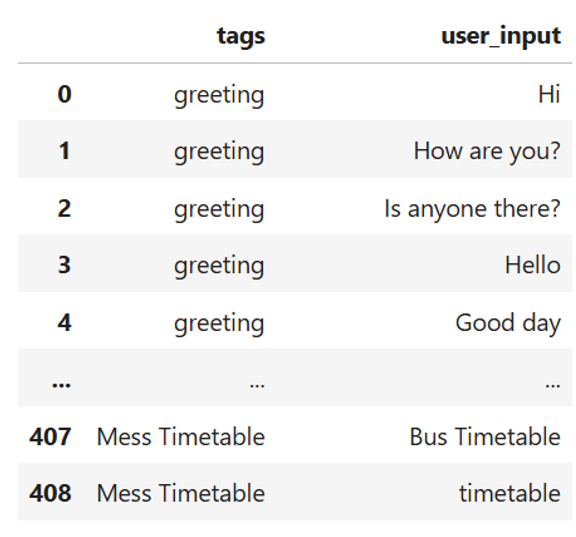
Then the responses and corresponding tags are also reorganized as data frame for clear representation of tag/intent for each chatbot response.
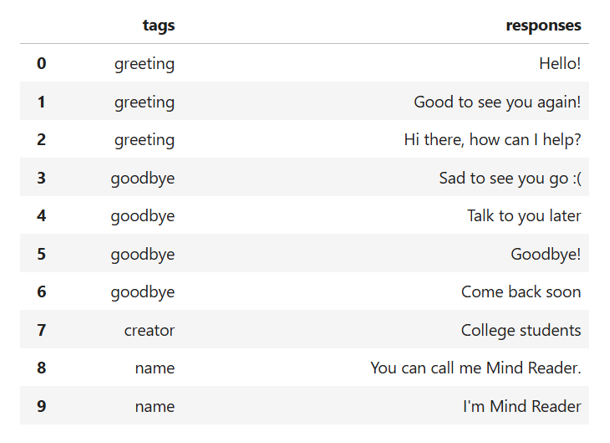
Data preprocessing
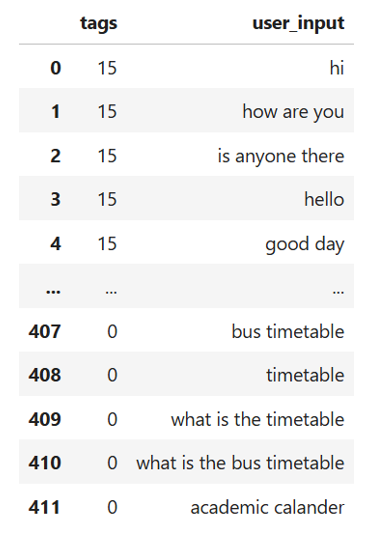
Each input sentence is converted into lower case. Then the punctuation marks are removed. The stop words are addressed. The stop words can be addressed by taking an experimental approach and observing chatbot model performance in the presence as well as absence of stop words in the user input. The processed and cleaned user sentences are further subjected to lemmatisation. The purpose behind lemmatisation is to extract root words that keep the base form and meaning of each word intact. Similarly, the tags or intents are converted into integer labels by applying label encoder. The cleaned data is shown here.
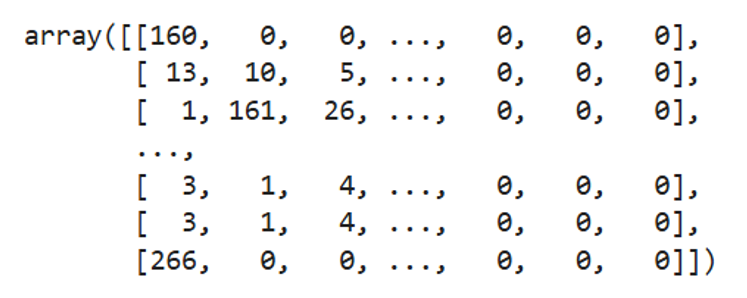
The cleaned user sentences are tokenised. Tokenisation segregates each sentence into a group of words. The words extracted from all sentences are combined and a set of unique words from the entire corpus is used as the vocabulary. The advantage of vocabulary is that it can be used to create sentence vectors where each word from the vocabulary is uniquely encoded. The sentence vectors are padded to the maximum length.
Building simple chatbot (Existing vocabulary of words)
The neural network model is used to build the chatbot. The first layer of the model is the input layer with input of length equal to the maximum length (maximum length of padded sequence). The second layer an embedding layer. For the embedding layer, the vocabulary size is the input dimension and the number of unique labelled responses is the output dimension. The next layer transforms the two-dimensional data into a single dimensional vector. The next three layers are the dense layers. The activation function for the hidden neural network layer is ‘ReLu’ and the ‘Softmax’ for the last layer is appropriate for multi-class classification. Adam optimiser is used to reduce the difference between predicted and actual output. Due to multi-class classification and integer coding of the labelled responses, sparse categorical cross-entropy is used as the loss function.
The model performance is evaluated by adding a validation set which is 10% of the train data.
Bringing all together and creating a chatbot system
If the user input is not discernible, the chatbot responds:
Sorry. I did not understand. Could you please rephrase?
The user input is processed and transformed into sentence vector. The input processing includes conversion into lower case, removal of punctuation marks and redundant words, lemmatisation, conversion of text to sequence vector followed by padding. The sentence vector is passed through the neural network. The output of the neural network is a vector of probabilities of length 8. The index with the maximum probability is selected and decoded into the corresponding tag/intent. The chosen tag has a range of pre-determined responses out of which the chatbot can select any one to address the user query.
In case, the chatbot fails to generate a response, the chat bot responds:
Sorry, I could not find a suitable response.
A confidence threshold can be added to boost the model’s performance and ensure that the chatbot’s response is in tune with the expected answer of a customer query. For instance, a threshold of 40% will select a neural network output only when the maximum probability of a labelled response is more than 0.4. In case the threshold falls below 0.4, the chatbot responds:
Sorry. Could not understand. Please rephrase.
Testing the chat bot:
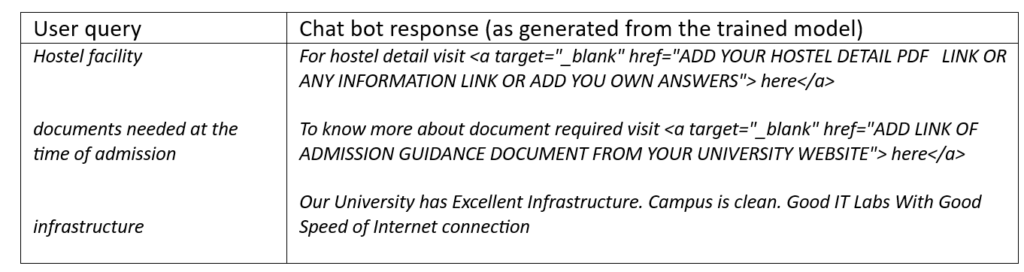
To test the chat bot dynamicity, the model can be tested for a new user input not found in the train data.
Condition: Inclusion and exclusion of Stop Words
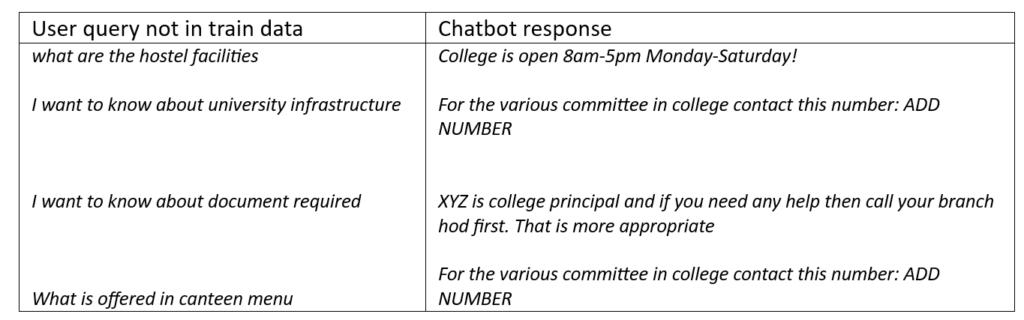
The inclusion and exclusion of stop words influences the model’s performance. It was observed that the inclusion of stop words adds many words to sequence vectors. More the number of words in a sentence, more intensive is the model training. The trained model is fitted on the exact pattern and sequence of words, thereby resulting in model overfitting. A slight deviation in a customer query from the fixed sentences of train data generates incorrect responses.
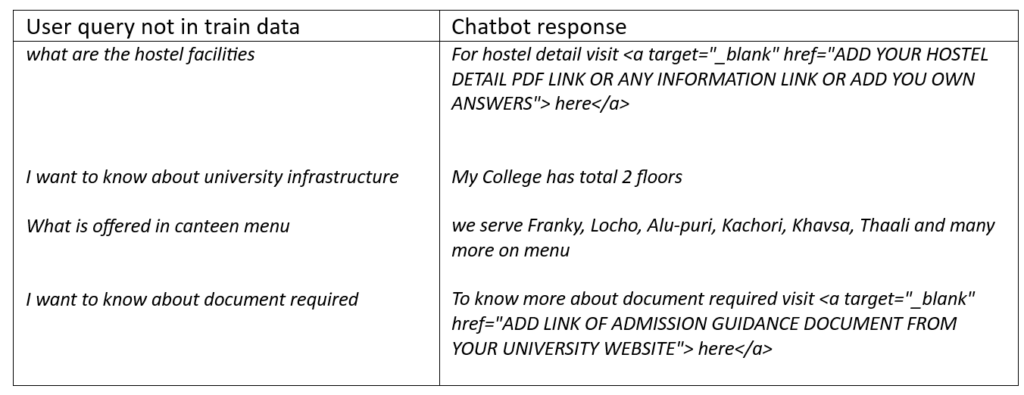
The Chatbot performance is influenced by the number of redundant words in user query. The exclusion of stop words removes many commonly used words and shrinks the query size to few important and infrequent words specific to the user intent. Consequently, the key words of a user input obtain higher weight and are retained in the final sentence. The important terms constitute the final dictionary and are used to encode each unique word of the input corpus (all possible user queries) into integer labels. An advantage of stop words exclusion is that it makes the chat bot more dynamic in handling similar user queries structured in different ways or any user query not present in the train data.
Chat bot performance: Inclusion of stop words
An example of chat bot response due to inclusion of stop words and model overfitting is shown below:
Chat bot performance: Exclusion of stop words
Limitations of this chatbot model
A simple chat bot uses existing vocabulary to identify the type of user query. If a key word in a new user query is expressed through its synonyms or identical words conveying similar meanings, the chatbot cannot identify the user intent and may ask the user to rephrase the query. This can repeat unless the user query contains one of the existing dictionary terms. This implies that the chat bot can give accurate response as long as the key words are from the existing dictionary of words. The limitation can be overcome by data augmentation that increases the size of the trained data from the existing corpus of words.